
Office chairs with adjustable lumbar support let you move the backrest's lower curve until it sits right in the small of your back, rather than hoping a fixed shape happens to fit. They suit anyone who spends long hours at a desk, whether you share an office chair with someone taller or you just want your back to feel looked after by the end of the afternoon.
Below you'll find pump-up pads, sliding panels and dynamic backrests that follow your body as you move. Prefer a cooler seat for warm rooms? Have a look at our ergonomic mesh chairs. Or if the budget is tight, our affordable ergonomic office chairs still give you a good level of back support.


Your lower spine curves gently inwards just above the belt line. When you're sitting for hours that curve tends to flatten as you slump, which puts extra load on the muscles and discs of your back. A lumbar support fills the gap between the backrest and your spine so the curve stays in place without you having to think about it.
The catch is that everyone's curve sits at a different height. A fixed bulge built into the chair might land perfectly for one person and press into the wrong spot for the next. That's why an adjustable lumbar support makes such a difference. You can move it up or down, push it further forward or let it ease back until your posture and comfort feel right.
The Health and Safety Executive's guide to good posture at a screen asks for exactly this. It says the back of the seat should give good lower back support, with a cushion added if it doesn't. So if you work from a home office, it's a simple box to tick when you choose an ergonomic office chair.
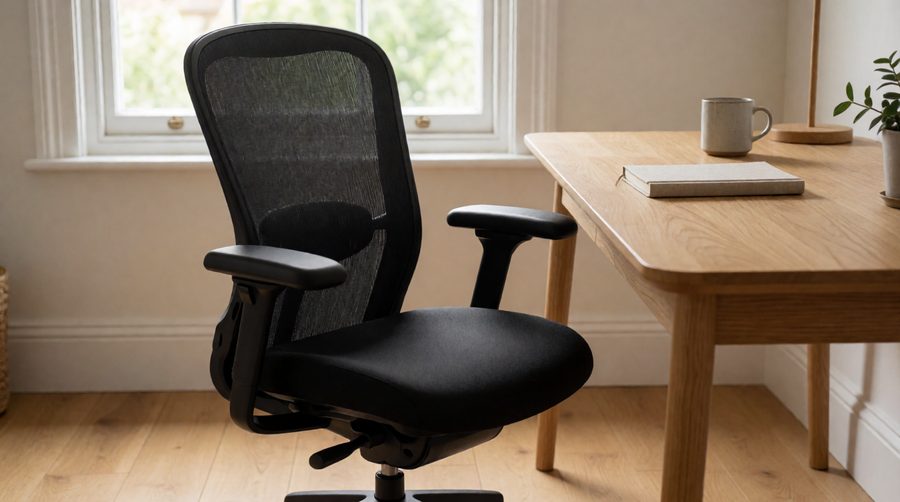
An ergonomic office chair is simply one that adjusts to fit your body rather than asking your body to fit the chair. Lumbar support is the headline feature, but it works best alongside a few others. Look for these on any chair you're considering.
Most of the office chairs in this collection tick every box. The ones that miss a few, such as gaming-style recliners, make up for it with deep recline angles.
Not every office chair adjusts in the same way. Knowing the types makes it much easier to read a product listing and spot what you're actually getting.
A small air bladder sits inside the backrest. You squeeze a hand pump to firm it up and press a release valve to soften it. Inflatable lumbar support is the classic choice on chairs built for long shifts because you can fine-tune the pressure through the day. The Office Hippo Heavy Duty Ergonomic uses this design alongside a ratchet back that slides up and down between 56 cm and 61 cm from the seat.
Many a mesh office chair has a separate padded panel on the back. You slide it up or down to find your curve and some let you push it forward for firmer support too. The Fractal Design Refine adjusts its lumbar for height and depth, which suits people who like to set things once and forget about them.
Newer designs use a sprung section that moves with you as you lean, twist or sit back. The FLEXISPOT ErgoX calls its version 5D adaptive support. The Newtral NT002 pairs an auto-following panel with a resistance dial so you choose how firmly it pushes back. Hbada's E3 Ultra goes further again with a three-zone panel that adjusts eight ways. SIHOO uses a similar bionic dynamic panel on its Doro S300.
Gaming-style and executive chairs often come with a strap-on or snap-on pillow. It's the simplest form of adjustment since you just move it to where it helps. The Anda Seat Novis Ultra, Flash Furniture X20 and mfavour MFV 38 all work this way. A pillow is easy to reposition, though it can slip if you shift around a lot.
| Lumbar type | How you adjust it | Best for |
|---|---|---|
| Pump-up (inflatable) | Hand pump and release valve | Shared seats, 24-hour use, people who like a firm feel |
| Height and depth pad | Slide up or down, push in or out | Setting it once for one user |
| Dynamic panel | Moves by itself, some with a tension dial | Long days with lots of shifting about |
| Removable pillow | Strap or snap it where you want | Gaming chairs and recliners |
We pulled these figures from the manufacturers' listings for chairs in this collection. Weight limits and recline angles vary a lot, so check them against your own height and how you like to sit.
| Chair | Lumbar adjustment | Max user weight | Recline | Other adjustments |
|---|---|---|---|---|
| FLEXISPOT ErgoX | 5D adaptive pad | 130 kg | Up to 135° | 6 cm seat slide, 3D arms, 3D headrest |
| Hbada E3 Ultra | Three-zone dynamic, 8-way | Not listed | No tilt function | 4D headrest, 360° arms |
| Newtral NT002 | Auto-following with resistance dial | Around 136 kg | 96°, 116° or 126° | Seat depth, 4D arms, 2D headrest, footrest |
| Office Hippo Heavy Duty | Pump-up (inflatable) | 152 kg | Tilt | 6 cm seat slide, ratchet back, 24-hour use rating |
| Fractal Design Refine | Height and depth pad | 125 kg | Three positions | 4D arms, head support |
| Efomao 3084UK | Adjustable pad | 200 kg | Three positions | Height adjustable arms, footrest |
| Anda Seat Novis Ultra XL | Removable pillow | 120 kg | 90° to 155° | For users up to 210 cm tall |
| mfavour MFV 38 | Removable pillow | 136 kg | 90° to 180° | Head pillow included |
A lumbar pad can only help if it reaches the right spot. Taller users need a long backrest with plenty of travel in the pad, while shorter users need a seat that drops low enough to keep their feet flat. If you're over 130 kg or so, look at our big and tall ergonomic chairs. Models like the Efomao 3084UK carry up to 200 kg and still come with an adjustable lumbar pad.
Mesh backs are breathable and most of the dynamic lumbar systems are built into them, so a mesh office chair suits warm rooms and long days. Padded fabric feels softer and often pairs with a pump-up support. Faux leather wipes clean and looks smart in a study, which is why it's common on our leather office chairs. These usually rely on a pillow rather than a built-in pad.
Lumbar support works best as part of a chair that fits you everywhere. Seat depth matters most here. The HSE suggests a gap of two to three centimetres between the front of the seat and the back of your knee. So a seat slide helps if your legs are shorter or longer than average. Height adjustable armrests take weight off your shoulders, while a tilt lock with tension control lets you lean back without the chair tipping too far. If you get neck ache as well, our computer chairs with a headrest add support higher up.
An office chair used all day takes a lot of wear. Look for a certified gas lift (SGS or BIFMA tested is a good sign) and a decent guarantee on the base, swivel and mechanism. The Hbada E3 Ultra comes with a five-year warranty on its base, gas lift and castors. The Office Hippo has a five-year component guarantee too.
A new chair only helps once it's set up properly. It takes five minutes at your desk and makes a real difference to how your back feels at the end of the day.
Then get up and move regularly. The NHS notes that lower back pain is very common and usually improves within a few weeks. If it keeps coming back or stops you doing everyday things, it's worth seeing your GP. The HSE also has useful advice on breaks and work routine at a computer screen.
It's easy to put up with a tired old office chair for years. These are the giveaways that it's time for one with proper adjustment.
Spend eight hours a day at a computer in a home office? A dynamic ergonomic office chair such as the FLEXISPOT ErgoX or Newtral NT002 keeps up with you as you shift position. For heavier users or shared office seats, inflatable lumbar support on a 24-hour rated chair is hard to beat. Want something that looks smart in a study? Our ergonomic executive office chairs mix padded high back designs with lumbar pillows.
Gamers often go for a recliner like the Anda Seat Novis Ultra because it tilts back to 155° for breaks. And if you'd rather stand for part of the day, a perch-style seat from our standing desk chairs range pairs nicely with a sit-stand desk. Some people swap their usual seat for a kneeling chair for an hour or two, which tilts the pelvis forward and opens up the hip angle.
It lets you move the backrest's lower support so it lines up with the natural inward curve of your spine. That helps you sit upright without effort and stops the curve flattening as you tire.
Neither is better for everyone. A pump-up pad lets you set an exact firmness, which many people with a sensitive back like. Dynamic panels need less fiddling because they follow you as you move.
It should press gently into the small of your back, roughly at belt height or just above. If you feel it on your bottom or between your shoulder blades it's in the wrong place.
A strap-on cushion is an easy way to add it to a chair with a flat back. The HSE also suggests a cushion where the seat doesn't give enough back support. A built-in adjustable pad is usually more stable though.
Good back support adds a lot of comfort to long days, but it doesn't replace moving. Try to stand up, stretch or walk around for a few minutes every hour or so.

