
 Newtral NT002 Ergonomic Office Chair (Black)
 YERAIRR YR-7032 Executive Office Chair (Black, PU Leather)
 Efomao Desk Office Chair (3008UK, Large)
 Efomao Desk Office Chair 3008UK (White, Big and Tall)
 EXCEBET Heavy Duty Executive Mesh Chair (XXL Seat, Model 3043)
 Flash Furniture X20 Gaming Chair (Grey, CH-187230-1-GY-GG)
An ergonomic office chair is one you can set up to fit your body, rather than one you have to fit around. It's the adjustment that does the work, not the badge or the price, and that's good news if you're shopping on a budget. A budget chair with a height adjustable seat, a back that moves and a lumbar support you can position will do more for your posture and comfort than an expensive ergonomic chair that doesn't fit you.
The law sets a sensible baseline. The Display Screen Equipment Regulations 1992 say a work chair must be stable, let you move freely and sit comfortably, with a seat that adjusts in height and a seat back that adjusts in both height and tilt. Your employer must also offer a footrest to anyone who wants one. Treat that list as the minimum when you shop for a cheap ergonomic office chair, because many low-cost "computer chairs" only adjust in height.
Reviewers agree that you don't need to pay a fortune. Expert Reviews named the Sihoo M57 its best budget office chair at £230 when reviewed, and argued that two-figure chairs tend not to be comfortable, supportive or durable in the long run. Creative Bloq picked the Sihoo M18 as its top budget office chair, which has a 150 kg weight limit, an adjustable headrest and a mesh back. Both cost a fraction of the price of a Herman Miller Aeron or a Steelcase chair, but they still give you the adjustments the regulations ask for.
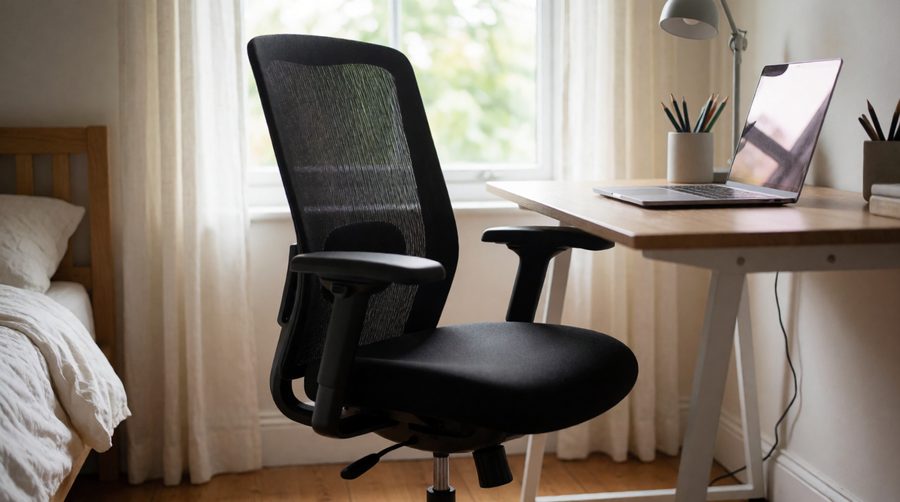
Money spent on a budget office chair should go on adjustment first and looks second. These are the features worth paying for, roughly in order of importance.
Your feet should rest flat on the floor with your thighs roughly level and your knees just below your hips. Most adults need a seat height somewhere between about 45 and 55 cm. The HSE guidance on good posture also suggests a footrest if your feet don't reach. Check the gas cylinder too: an SGS certified Class 3 or Class 4 cylinder is a good sign on a cheaper model, and Class 4 is the heavier duty grade.
Lumbar support fills the curve of your lower back so you don't slump. Fixed pads only help if the curve happens to sit in the right place for you. Adjustable lumbar support that moves up and down (or in and out) is the single most useful upgrade on a cheap chair. The ErgoX goes further with a 5D adaptive support that follows you as you lean.
Aim for a gap of two to three fingers between the front edge of the seat and the back of your knees. Too deep and you perch on the edge; too shallow and your thighs aren't supported. Seat depth adjustment is rare at this price, so it's a strong reason to choose one chair over another. The ErgoX and the Office Hippo both slide their seat 6 cm.
A backrest that tilts lets you shift position through the day, which is better for you than holding one pose. Look for a tilt lock so you can fix the back upright while you type, and a tension knob so it doesn't throw you back. A recline to 135 degrees is useful for breaks, though you won't work at that angle.
Armrests should let your shoulders relax with your elbows close to desk height, which takes strain off your neck through the working day. Height adjustable arms are the minimum; flip-up armrests let you tuck the chair right under the desk. Fixed arms that are too high push your shoulders up and are one of the most common faults on cheap chairs.
Breathable mesh keeps you cooler and is the usual choice for a home office desk chair in summer. Fabric is warm, soft and comfortable and hides wear well. Faux leather wipes clean but doesn't breathe, and a cheap coating can peel. Budget chairs often pair a mesh back with a padded seat, which is a good mix. If you want the plusher look, browse our leather office chairs.
We pulled the specs for every chair in this collection from our own product feed, so you can compare real numbers instead of marketing claims. All seven are in stock on Amazon UK as we write.
| Chair | Cover | Max weight | Seat height | Recline | Key ergonomic features |
|---|---|---|---|---|---|
| FLEXISPOT ErgoX | Polyester mesh | 130 kg | 9 cm range | Up to 135° | 5D lumbar, 3D arms, 3D headrest, seat slides 6 cm |
| Office Hippo Heavy Duty | Fabric | 152 kg | 47-56.5 cm | Tilt | Seat depth (6 cm), certified for 24 hour use, 5 year parts guarantee |
| YERAIRR YR-7032 | Faux leather, mesh panel | 200 kg | 47-55 cm | 90-120° | Adjustable headrest, lumbar support, flip-up arms |
| EXCEBET 3043 | Mesh back, foam seat | 180 kg | Height adjustable | 95/115/135° lock | 57.5 cm XXL seat, 14 cm pocket springs, Class 4 gas lift |
| Efomao 3084UK | Cotton fabric | 200 kg | 48 cm | 3 positions | 60 cm deep seat, height adjustable arms, footrest |
| Efomao 3008UK (Large) | PU leather | 200 kg | 48 cm | Up to 135° | Retractable footrest, SGS Class 3 gas lift, nine colours |
| Efomao 3008UK (White) | Faux leather | 200 kg | 48 cm | Up to 135° | Retractable footrest, 58 cm wide backrest |
The figures show a clear split. The ErgoX and the Office Hippo are true task chairs built around adjustment - lumbar, seat depth and arms - and suit a normal working day at a desk. The Efomao and YERAIRR models are padded, high back recliners with footrests and 200 kg ratings. They're more comfortable for lounging and suit bigger frames, but they offer less fine adjustment for typing. If you need more room, our big and tall ergonomic chairs go further on seat width and weight limits.

For a full working day at a computer, a mesh task chair with adjustable lumbar support is the best value buy. It keeps you cool, it moves with you and it usually has the most adjustment for the money. The ErgoX, the Sihoo M57 and the Sihoo M18 all fit this group, and so do most of the chairs in our best ergonomic mesh chairs range.
A high back executive chair has thick padding, a headrest and often a footrest. It looks smart on a video call and is lovely to lean back in. The trade-off is less adjustment: many have fixed lumbar shaping and no seat depth slide. See our ergonomic executive office chairs if this style appeals, or our computer chairs with a headrest for neck support at a lower price.
Standard chairs are usually rated to around 120-136 kg. If you're heavier or taller, choose a chair rated well above your weight - the EXCEBET 3043 takes 180 kg and the Efomao models 200 kg. A wider seat and a stronger gas lift make a cheap chair last far longer for a larger user.
A gaming chair can look like good value for money, with lots of padding and a deep recline. Most have bucket seats with raised side bolsters and loose lumbar pillows rather than a proper adjustable lumbar support, so for work at a desk a proper office chair usually supports you better. If you game and work in the same seat, a gaming chair with an adjustable backrest and 4D armrests is the best compromise.

A cheap office chair set up properly beats an expensive office chair set up badly. Take ten minutes to get your office chair right on day one, and adjust it again if you change desk or screen.
The HSE workstation checklist covers the chair alongside your desk, screen and keyboard and is a handy way to check your whole home office. If you use a standing desk for part of the day, our adjustable standing desk chairs work at taller heights too.
An affordable office chair and a premium ergonomic chair share the same basic adjustments. The price gap mostly pays for refinement, materials and the length of the warranty, not for a different kind of support.
| Affordable ergonomic chair | Premium ergonomic chair (Herman Miller, Steelcase) | |
|---|---|---|
| Seat height and tilt | Yes, gas lift and tilt lock | Yes, often with a smoother synchro tilt |
| Lumbar support | Adjustable on the better models, fixed on the cheapest | Adjustable, often built into the backrest |
| Seat depth | Sometimes (ErgoX, Office Hippo) | Usually |
| Armrests | Height adjustable or flip-up | Height, width, depth and angle |
| Materials | Mesh, fabric or PU, sponge foam | Engineered mesh, moulded foam, aluminium |
| Warranty | Often 1-3 years (5 years on the Office Hippo parts) | Often 10-12 years |
For most people working from a home office a few days a week, that refinement is nice to have rather than essential. If you sit for long hours every day and plan to keep the chair for a decade, spending more can still be good value for money. Our computer chairs under £500 sit in between.
Low prices have to come from somewhere. These are the things to check in the photos and specs before you order.
If you'd like a different way of sitting altogether, an ergonomic kneeling chair tips your hips forward and is a low-cost alternative for shorter spells. For a desk where you don't want the chair to roll, look at our comfortable desk chairs with no wheels.
A chair that fits you and is set up properly can make sitting more comfortable and help you keep a good posture, but no chair cures back pain on its own. Moving matters as much as the seat. The NHS advice on back pain recommends staying active and explains when to see a GP. Get up from your desk chair every 30 to 60 minutes, change position often, and use the tilt so your back isn't held still all day.
The better ones are. If a budget chair has a height adjustable seat, a back that adjusts in height and tilt, and movable lumbar support, it can be genuinely ergonomic. Very cheap computer chairs often skip these, so check the spec list rather than the product title. A cheap office chair that only goes up and down isn't ergonomic, whatever the listing says.
Reviewers' budget picks such as the Sihoo M57 and Sihoo M18 show that well specified mesh chairs exist for a few hundred pounds. Spending more usually buys a longer warranty, better materials and finer adjustment rather than a completely different level of support.
A mesh office chair is cooler and suits warm rooms and long sitting. Fabric is softer and warmer and hides wear well. Both work; choose on the adjustment the chair offers first.
Choose a chair rated comfortably above your own weight. Many standard chairs take 120-136 kg, while heavy duty models like the EXCEBET 3043 (180 kg) and the Efomao 3008UK (200 kg) suit bigger users.
Not for typing. A headrest adds comfort when you lean back to read or take calls. The ErgoX and the YERAIRR YR-7032 both include an adjustable one.
If you're an employee who uses a screen for daily work, your employer has duties under the DSE Regulations, including for home workers. The HSE display screen equipment pages explain what they should assess.
